溯祖模型模拟 Coalescent model COSI2

一,简介

COSI2是一款基于溯祖理论(Coalescent theory)的模拟软件, 可以用来模拟群体的单倍型。

url:https://github.com/broadinstitute/cosi2

从github上clone到本地后,解压并编译

tar xvfz cosi-2.0.tar.gz
cd cosi-2.0
./configure
make

二,使用方法

基本语法

coalescent -p paramfile -m

-p 是指定参数文件;-m 是指定输出文件格式为Richard Hudson’s ms simulator的输出格式, 可以参考http://home.uchicago.edu/rhudson1/source/mksamples.html

参数文件中可以通过关键字来定义群体结构等各类模拟参数。

1.1. 指定模拟的范围长度,单位是 basepairs

length <length in bp>

1.2. 突变率

mutation_rate <mutation rate per bp per generatio>

1.3.重组率

recomb_file <file-name>

需要指定额外的 genetic map 文件,这个文件包含两列,有空格分隔。第一列给出基于碱基对的位置,第二列给出到下一位点的交叉重组率(每代)。第一列需要为严格的升序。 只有一行的文件则代表恒定的重组率。

例如:

1	9.92772e-09
156	1.00420e-08
373	1.01177e-08
923	9.77556e-09
1666	9.29830e-09
2704	9.19754e-09

附带的 recosim (在文末介绍) 程序也可以基于给定的重组热点的分布来随机生成一个genetic map。

2 群体

任何出现在模拟中的群体都需要被明确指定

pop_define <pop id> <label>
pop_size <pop id> <size>
sample_size <pop id> <n samples>

pop id 为整数值,在之后描述demographic events时会用到。 label 则是方便我们阅读用的标签。pop_size 是指群体中二倍体的数量。sample则指单倍体样本的数量。

例如

pop_define 1 European
pop_size 1 10000
sample_size 1 50

指定了ID为1的 ‘‘European’’群体,大小为10000,抽取的单倍体样本为50

3. demographic history 群体变迁史

#population size
pop_event change_size <label> <pop id> <T> <size for time > T>
#exponential expansion 
pop_event exp_change_size <label> <pop id> <Tend> <Tstart> <final size> <start size>
pop_event exp_change_size "expansion" 1 50 500 10000 1000
# bottleneck event
pop_event bottleneck <label> <pop id> <T> <inbreeding coefficient>
#migration rate
pop_event migration_rate <label> <source pop id> <target pop id> <T> <probability of migration/chrom/gen>
#population split
pop_event split <label> <source pop id> <new pop id> <T>
#admixture
pop_event admix <label> <admixed pop id> <source pop id> <T> <fraction of admixed chroms from source>
#sweep
pop_event sweep <pop> <Tend> <selection coefficient> <position of causal allele (0.0-1.0)> <freq at Tend>

输出格式:

-m 结果格式为  Richard Hudson’s ms simulator 的格式,直接打印在标准输出里。

-o basename 生成cosi的格式,对于每个群体,分别生成basename.pos-<pop id> 与 basename.hap-<pop id> 文件。basename.hap-<pop id>包含了单倍体型, basename.pos-<pop id> 则是变异的位置。在 basename.hap-<pop id> 中,2指代祖先的allele,1则是衍生的allele。

例:

# basename.hap-<pop id>
0	1	2 2 2 2 2 2 2 2 2 2 2 2 2 2 2 ...

# basename.pos-<pop id> 
SNP CHROM CHROM_POS ALLELE1 FREQ1 ALLELE2 FREQ2
1 1 85.409249 1 0.000000 2 1.00000
...

三,使用 recosim 生成recombination maps

用法: recosimulate <parameter file name> <region size (bp)>

用于生成 recombination maps 的参数文件如下:(所有参数都是可选的)

outfile <output file name>    [default="model.out"]
model <0,1>    [default=0]
 model 0: uniform recombination, constant or drawn from distribution.
 model 1: model 0 + gamma-distributed hotspots.
baserate <mean recomb (cM/Mb)>    [default=1.0]
distribution <recomb distr. file name>    [default=none (const value)]
space <mean hotspot spacing (bp)>    [default=9000]
distance_shape <gamma function shape param>    [default=1.0]
intensity_shape <gamma function shape param>    [default=0.3]
local_shape <gamma function shape param, local variation>    [default=0.3]
local_size <size of region of local variation (bp) (e.g. 100000)>    [default=50000000]
bkgd <fraction in flat bkgd>    [default=0.1]
random_seed <integer seed> (0=>picked by program based on time and PID) [default=0]

如果使用 model 0 ,那么重组率对于模拟的区域来说是恒定的,可以通过 baserate 来直接指定,也可以通过 distribution 来从指定分布文件中随机生成。

分布文件格式如下:

bin_start bin_end cumulative_fraction

 Where bin_start and bin_end specify a range of recombination rates (in cM/Mb) and the cumulative fraction is the probability that the recombination rate lies within this or earlier bins. Entries should be in order of increasing rate;

例:examples/bestfit/autosomes_deCODE.distr

0.0 0.2 0.05052
0.2 0.4 0.14890
0.4 0.6 0.27919
0.6 0.8 0.40295
0.8 1.0 0.50370
1.0 1.2 0.59713
1.2 1.4 0.66145
1.4 1.6 0.71358
1.6 1.8 0.77198
1.8 2.0 0.80874
2.0 2.2 0.84086
2.2 2.4 0.86372
2.4 2.6 0.88945
2.6 2.8 0.91396
...

如果使用 model 1 ,重组率则是变化的。

 the recombination rate varies across the region; the variation can be on both local and fine scales. With this model, the baserate or distribution parameters are still valid, but they now set the expected value of the recombination rate in the entire region, the value around which local rates vary. A fraction of the mean rate can be kept constant across the region, using the bkgd parameter. The remainder of the recombination rate varies locally in windows across the region, with the size of the window controlled by the parameter local_size; that is, if local_size is set to 100 kb, a new value is chosen every 100 kb. The value is chosen from a gamma distribution (with shape parameter set by local_shape), with a mean value determined by the regional rate (and the background fraction). Within each window, recombination is clustered into point-like hotspots of recombination. These have a gamma-distributed intensity with shape parameter intensity_shape (and mean determined by the local rate), and a gamma-distributed spacing with shape parameter distance_shape and mean set by parameter space.

With model=1 and a small value for intensity_shape, there is a small but extended tail at very high recombination rates; when simulating long sequences, this can make the coalescent simulator take orders of magnitude longer on a small fraction of runs. I have therefore found it useful to truncate the tail within recosim. (There is a commented-out line for doing so in the code.)

A final option is random_seed, which permits the user to specify a seed for the random number generator; this is useful for debugging or recreating a previous run. If a seed of zero is supplied, or the keyword is not found, a random seed will be generated from the time and process id of the job. In any case, the random seed used is always output to stdout during execution.

附录:

cosi2命令行选项

	Specifying the model:
		-p [ --paramfile ] arg          parameter file
		-R [ --recombfile ] arg         genetic map file (if specified, overrides the
																		one in paramfile)
		-n [ --nsims ] arg (=1)         number of simulations to output
		-r [ --seed ] arg (=0)          random seed (0 to use current time)

		-J [ --trajfile ] arg           file from which to read sweep trajectory.  It has two columns: first column gives the generation, second gives the fraction of chromosomes in the sweep population carrying the derived (advantageous) allele.

		-u [ --max-coal-dist ] arg (=1) for Markovian approximation mode, the level 
																		of approximation: the maximum distance 
																		between node hulls for coalescence to be 
																		allowed.  Distance is specified as a fraction
																		of the total length of the simulated region, 
																		in the range [0.0-1.0]; 1.0 (default) means 
																		no approximation.

	Specifying the output format:
		-o [ --outfilebase ] arg base name for output files in cosi format
		-m [ --outms ]           write output to stdout in ms format

	Specifying output details:
		-P [ --output-precision ] arg number of decimal places used for floats in the outputs
		-M [ --write-mut-ages ]       output mutation ages
		-L [ --write-recomb-locs ]    output recombination locations

	Misc options:
		-h [ --help ]                      produce help message
		-V [ --version ]                   print version info and compile-time options
		-v [ --verbose ]                   verbose output
		-g [ --show-progress ] [=arg(=10)] print a progress message every N 

参考:
http://home.uchicago.edu/rhudson1/source/mksamples.html

https://github.com/broadinstitute/cosi2

人类参考基因组 Human reference genome CHM13/hg19/hg38/GRCh37/GRCh38/b37/hs375d

本文基于 https://github.com/Cloufield/CTGCatalog/tree/main/Reference_data/Genome

目前使用较为广泛的人类参考基因组的版本有(20221011更新):

  • CHM13
  • GRCh38 / h38
  • GRCh37 / hg19
  • hs375d
  • b37
  • humanG1Kv37

CHM13

目前最新的参考基因组版本,利用long-read seq技术与名为CHM13 的纯合的完全性葡萄胎(complete hydatidiform mole)的细胞系,T2T项目完成了人类第一个完整的参考基因组CHM13,该成果与其相关研究于2022年发表于Science上。

  • 链接: https://github.com/marbl/CHM13
  • 内容: chr1-22(CHM13),chrX(CHM13),chrY(NA24385),chrM(CHM13)
  • 参考: Nurk, S., Koren, S., Rhie, A., Rautiainen, M., Bzikadze, A. V., Mikheenko, A., … & Phillippy, A. M. (2022). The complete sequence of a human genome. Science, 376(6588), 44-53.

GRCh38 / hg38

由基因组参考联合会 (Genome Reference Consortium)发布,正式名称为GRCh38(Genome Research Consortium human build 38),也被称为hg38(Human genome build 38, UCSC发布的版本),初版发布于2013年12月,特点是使用ALT contigs来代表常见的复杂变异,例如HLA loci.

GRCh38 (GRCh38.p14) 链接: https://www.ncbi.nlm.nih.gov/assembly/GCF_000001405.40

UCSChg38 链接: https://hgdownload.soe.ucsc.edu/goldenPath/hg38/bigZips/

该版本的组装主要包含:

  • 组装的染色体:1-22号染色体(chr1-22),X(chrX),Y染色体(chrY),以及线粒体DNA(chrM)
  • Unlocalized sequences :已知位于某一染色体上,但方向和位置未知, 该类序列有_random后缀标注
  • Unplaced sequences:未知染色体来源的序列,有chrU_ 前缀标注
  • Aalternate loci/ALT contigs :有 _alt 后缀标注,为某一区域可能的其他序列,表示这一区域的基因多样性

此外还包括:

  • Pseudo-autosomal regions (PAR): XY染色体上的同源序列
  • Homologous centromeric and genomic repeat arrays: 着丝粒 与 基因组重复序列(卫星DNA)
  • EBV & decoys:EB病毒 与 诱饵序列等不能map到人类基因组的序列
GRCh38.p7的染色体图。放大的区域表示蓝色区域有大量的N。

GRCh37/ hg19

基因组参考联合会 (Genome Reference Consortium)于2009年2月发布的历史版本,近年发表文献多使用这一版本,但逐渐再向 GRCh38 过渡。

GRCh38 相比 GRCh37,修改了8000多错误的单核苷酸,纠正了若干错误组装的区域,填充了部分gap,新增了着丝粒(centromeres)的序列,并且大幅增加了alternate loci的数量。

University of California at Santa Cruz (UCSC) 于 2009 年 2 月发布的人类基因组组装hg19,与GRCh37序列基本相同,但具有不同的线粒体序列和其他替代的单倍型组装。对染色体的命名不同,为“1”,“2”。

GRCh37.p13 : https://www.ncbi.nlm.nih.gov/assembly/GCF_000001405.25

UCSC hg19: http://hgdownload.cse.ucsc.edu/goldenpath/hg19/bigZips/


hs37d5

在 千人基因组项目第二阶段 (1000 genome phase II) 中组装的参考基因组,来自Broad Institute,主要包括以下序列:

  • GRCh37:Integrated reference sequence from the GRCh37 primary assembly (chromosomal plus unlocalized and unplaced contigs)
  • rCRS 线粒体序列:The rCRS mitochondrial sequence (AC:NC_012920)
  • 人疱疹病毒 4 型 1 类:Human herpesvirus 4 type 1 (AC:NC_007605)
  • 级联诱饵序列的数据(名称的由来):Concatenated decoy sequences (hs37d5cs.fa.gz)

b37

在 千人基因组项目第一阶段 (1000 Genomes Project Phase I ) 中组装的参考基因组,由Broad Institute发布,该组装主要基于GRCh37,包括来自 GRCh37、rCRS 线粒体序列和人疱疹病毒 4 型 1 类的数据。

  • 文件名: Homo_sapiens_assembly19.fasta
  • 来源: the 1000 Genomes Project Phase I and III, Broad Institute
  • URL : https://data.broadinstitute.org/snowman/hg19/
  • 内容: 1…22,X,Y,MT, unlocalized sequences (GL000191.1 …), unplaced sequences(GL000211.1 …) , NC_007605

humanG1Kv37

参考资料:

https://gatk.broadinstitute.org/hc/en-us/articles/360035890711?id=23390

https://cloud.google.com/life-sciences/docs/resources/public-datasets/reference-genomes

https://www.sciencedirect.com/science/article/pii/S0888754317300058

分位数-分位数图 QQ plot

QQ plot 是 GWAS结果可视化的非常有力的工具之一。 通过QQplot 我们可以直观地判断GWAS结果统计量是否存在inflation,是否存在过多的假阳性等,从而了解我们的分析是否存在群体分层等系统性的问题。

QQ plot 全称是 quantile-quantile plot (分位数-分位数图),是在统计学中,通过比较两个概率分布的分位数对这两个概率分布进行比较的概率图方法。分位数是指将一个随机变量的概率分布范围分为几个等份的数值点,常用的有中位数(即二分位数)、四分位数、百分位数等。

GWAS的QQplot中,作图的对象为关联分析时得到的p值,与曼哈顿图一样,通常我们将p之转化为-log10(p)。qqplot的x轴为期望分布(expected distribution),在这里实际为(0,1)的均匀分布的分位数,y轴则是观察分布(observed distribution),也就是我们实际得到的p值的分位数。

作图的目的我们可以简单理解为,实际得到的p值是否是服从均匀分布。因为如果检验的所有snp都与表型不相关,那么p值就会成(0,1)的随机分布。

下面用python现实如何作图:

GWAS入门文章与书籍推荐

对于统计遗传学(全基因组关联分析)的初学者来说,最难得莫过于入门,

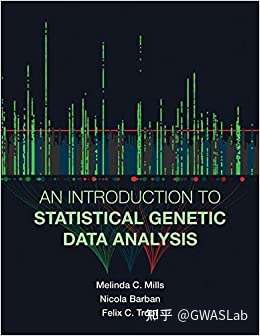
好在GWAS问世以来已经过了十多年,该研究领域也形成了一定规模,基础内容逐渐充实,2020年出版的 An Introduction to Statistical Genetic Data Analysis 网罗该领域内研究背景,基础知识,常用工具介绍,代码实操等。

本书第一部分主要介绍相关基础内容,涵盖群体遗传学的基本概念,统计学基础,人类进化(Human evolution),GWAS,风险评分(PRS)等等基础内容。

第二部分介绍遗传数据的处理与使用,质控(QC),人群分层,PCA,等等GWAS的操作步骤。

第三部分则是介绍GWAS下游的分析方法,包括基因环境相互作用,PRS,数据可视化,MTAG,孟德尔随机化等。

图1: An Introduction to Statistical Genetic Data Analysis 封面

原书链接: https://mitpress.mit.edu/books/introduction-statistical-genetic-data-analysis

这本书难度适中,适合初学者入门,对于理解基础概念会有很大帮助,但深度不够,个人建议可以快速阅读这本书,掌握群体遗传学研究的大致框架后,针对感兴趣的领域查找文献原文来了解细节。也可以阅读Nature Reviews Genetics上关于GWAS的综述文章,对本领域入门很有帮助。


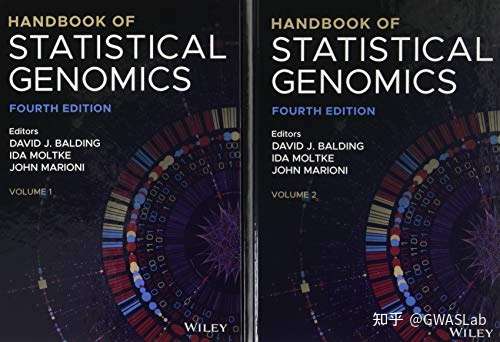
对于希望尝试更硬核内容的同学们,我还强烈推荐这本书,Handbook of statistical genomics,本书更偏向数理原理,有大量的公式推导等,非常刺激,对于无数理基础的初学者则不太推荐此书。

图2: Handbook of statistical genomics 封面

除了书籍以外,其他适合入门的资料还包括:

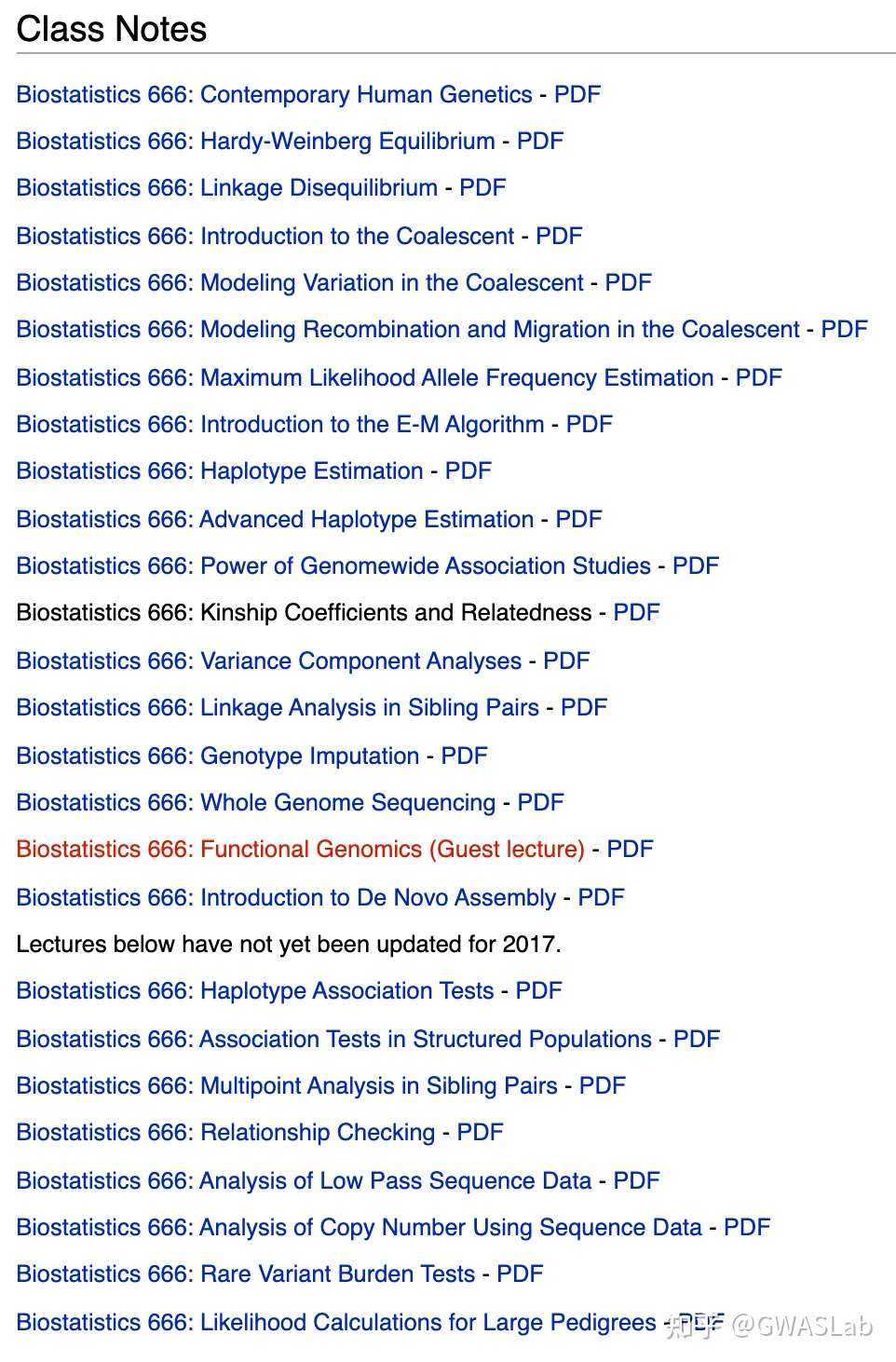
密西根大学的开设的biostats 666这门课的slides(听着这课的名字是不是就很6)(请记住这个这位大佬的网站Genome Analysis Wiki 以后你会用到无数次的),

Biostatistics 666: Main Page

该课程也涵盖了统计遗传学中重要的概念知识点,包括了基础概念以及部分统计原理,适合快速浏览:

图3 :Biostatistics 666: slides 截图

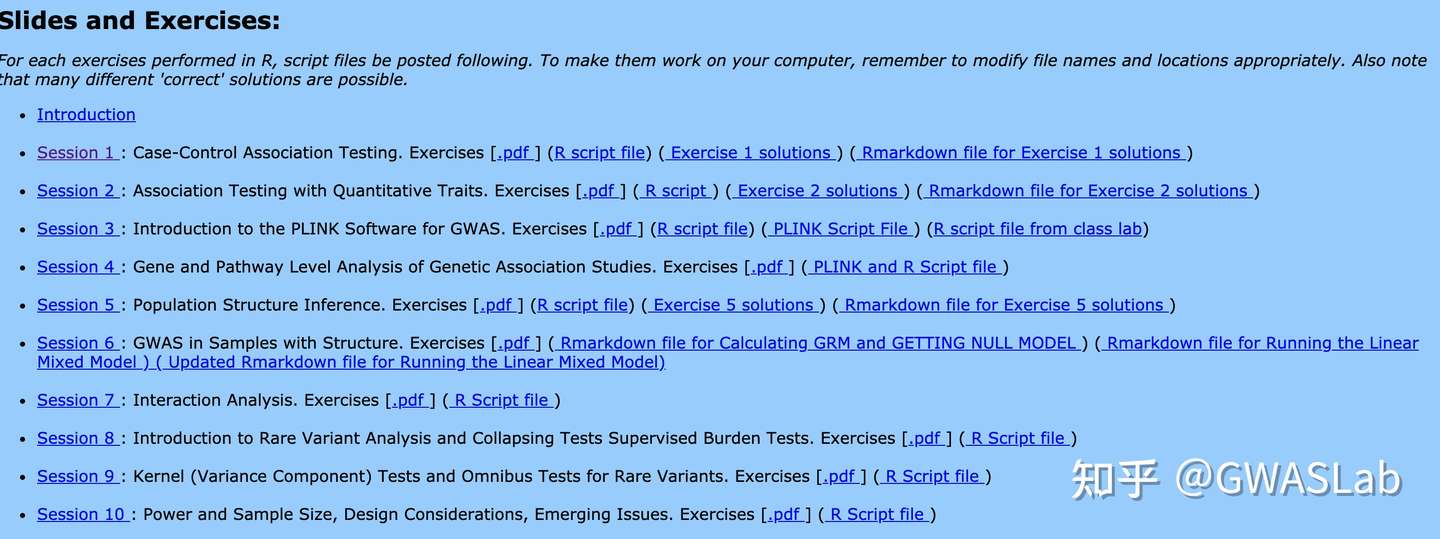
华盛顿大学遗传统计学夏季学校 SISG 讲义:

除了理论基础,还有代码实操等。可以跟着代码一起练习,非常适合初学者。

GWAS and Sequencing Data

图4 : SISG slides 截图

另外就是大阪大学遗传统计学夏季学校的讲义分享, 我最喜欢的零基础入门其实是这个,图文并茂, 概念细节比较到位(但是是日语的,有机会了给大家翻译):

https://www.slideshare.net/YukinoriOkada/presentations

最后,当然,还有GWASLab的主页:GWASLab

博客连接:GWAS文章索引 – Article index

以及GWAS相关文章汇总:GWASLab:全基因组关联分析GWAS文章汇总(持续更新)

我会持续更新统计遗传学,生物信息学等相关中文内容,感谢大家的关注!

使用 PLINK 去除重复 variants

在GWAS中,有时数据中会出现多个variants有相同的位置和等位基因,绝大多数情况下这些variants都是相同的重复。我们应当合并并去除这些重复。

plink1.9提供了如下命令来筛除重复的variants:

–list-duplicate-vars [‘require-same-ref’] [‘ids-only’] [‘suppress-first’]

具体用例

plink --file test --list-duplicate-vars ids-only suppress-first -out test-removed

–ids-only: 只输出重复snp的id,不输出位置信息

–suppress-first : 每一组重复的snp中,输出时去除第一个

运行后我们会得到 .dupvar文件,包含了所有重复的snp的id,这样在后续分析中,我们可以使用 –exclude 选项来将重复的snp剔除。(注意:去重是基于SNP的位置信息,而非ID,如果想基于ID去重,请使用PLINK2.0 的 –rm-dup 选项)

参考:

https://www.cog-genomics.org/plink/1.9/data#list_duplicate_vars

连锁不平衡分数回归 LD score regression

本文包含以下三个部分:

  • 理论基础
  • 下载安装
  • 使用教程

LDSC相关链接:

基于功能分类分割遗传力 – 分层LD分数回归 Stratified LD score regression 


1. 理论基础

什么是LD score?

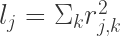
SNP j的LD score可以被定义为该SNP与一定范围内其他SNP的r2之和。 LD score 衡量了该SNP标记的遗传变异性的大小。

l_j= \Sigma_k{r^2_{j,k}}

为什么要做 LD score regression?

在GWAS研究中,多基因性(polygenicity,即若干较小的基因效应)和干扰因素引起的偏差(如隐性关联 cryptic relatedness,群体分层population stratification等)都会造成检验的统计量的分布偏高(inflated)。但我们并不能分辨偏高的统计量到底是来自多基因性还是干扰因素,所以通过LD score regression,我们可以通过研究检验统计量与连锁不平衡(linkage disequilibrium)之间的关系来定量分析每部分的影响。

LDscore的原理?

GWAS检验中,对一个SNP效应量的估计通常也会包含与该SNP成LD的其他SNP的效应,也就是说一个与其他SNP成高LD的SNP,通常也会有更高的卡方检验量。

什么是LD score regression?

E[\chi^2|l_j] = {{Nh^2l_j}\over{M}} + Na + 1

其中N为样本量,M是SNP的数量,所以h2/M是平均每个SNP解释的遗传力(heritability),a衡量了干扰因素的影响(包括隐性关联与群体分层),lj则是上述的LD score。

从LD score regression的结果中,我们可以得到怎样的信息?

如果我们用LD score对卡方统计量做回归,那么截距减1就是一个对干扰因素平均效应的估计值(estimator)。


2. 下载安装

接下来简单介绍如何进行LDscore regression。使用的软件为ldsc,可以从作者的github中拉取。ldsc为python脚本,clone了ldsc的库之后我们还需要利用anaconda配置环境,下载相关联的package。

ldsc: https://github.com/bulik/ldsc

git clone https://github.com/bulik/ldsc.git
cd ldsc
conda env create --file environment.yml
source activate ldsc

以上步骤完成后,可以输入以下命令来检测是否安装成功

./ldsc.py -h
./munge_sumstats.py -h

除此以外,还需要相应群体的LD score,好消息是作者提供了处理好的欧洲 European 与 东亚 East asian的基于1000 genome的LD score以供我们使用,可以通过以下链接下载:

https://alkesgroup.broadinstitute.org/LDSCORE/

如果想使用其他的LD score则需要自行计算。j计算方法可参考:https://github.com/bulik/ldsc/wiki/LD-Score-Estimation-Tutorial


3. 使用教程

本教程改编自: https://github.com/bulik/ldsc/wiki/Heritability-and-Genetic-Correlation

主要介绍:1.the LD Score regression intercept for a schizophrenia GWAS 与 2.the SNP-heritability for schizophrenia

使用的数据来自 2013年发表的 PGC Cross-Disorder paper in the Lancet.,精神分裂症 sci 与 双相障碍 bip

3.1 准备步骤

下载LD score

wget https://data.broadinstitute.org/alkesgroup/LDSCORE/eur_w_ld_chr.tar.bz2
tar -jxvf eur_w_ld_chr.tar.bz2

下载GWAS summary 统计量数据

wget www.med.unc.edu/pgc/files/resultfiles/pgc.cross.bip.zip
wget www.med.unc.edu/pgc/files/resultfiles/pgc.cross.scz.zip

下载后解压,head命令查看文件是否正确

head pgc.cross.SCZ17.2013-05.txt

snpid hg18chr bp a1 a2 or se pval info ngt CEUaf
rs3131972	1	742584	A	G	1	0.0966	0.9991	0.702	0	0.16055
rs3131969	1	744045	A	G	1	0.0925	0.9974	0.938	0	0.133028
rs3131967	1	744197	T	C	1.001	0.0991	0.9928	0.866	0	.
rs1048488	1	750775	T	C	0.9999	0.0966	0.9991	0.702	0	0.836449
rs12562034	1	758311	A	G	1.025	0.0843	0.7716	0.988	0	0.0925926
rs4040617	1	769185	A	G	0.9993	0.092	0.994	0.979	0	0.87156
rs4970383	1	828418	A	C	1.096	0.1664	0.5806	0.439	0	0.201835
rs4475691	1	836671	T	C	1.059	0.1181	0.6257	1.02	0	0.146789
rs1806509	1	843817	A	C	0.9462	0.1539	0.7193	0.383	0	0.600917

3.2 第一步 数据清理 (munge_sumstats.py)

原始数据并不是ldsc所需要的.sumstats 格式,所以我们需要先清理并提取需要的数据。利用ldsc附带的munge_sumstats.py可以将原始数据转换成.sumstats 格式。

The ldsc .sumstats format requires six pieces of information for each SNP:

  1. A unique identifier (e.g., the rs number)
  2. Allele 1 (effect allele)
  3. Allele 2 (non-effect allele)
  4. Sample size (which often varies from SNP to SNP)
  5. A P-value
  6. A signed summary statistic (beta, OR, log odds, Z-score, etc)
wget https://data.broadinstitute.org/alkesgroup/LDSCORE/w_hm3.snplist.bz2
bunzip2 w_hm3.snplist.bz2
munge_sumstats.py \
--sumstats pgc.cross.SCZ17.2013-05.txt \
--N 17115 \
--out scz \
--merge-alleles w_hm3.snplist

munge_sumstats.py \
--sumstats pgc.cross.BIP11.2013-05.txt \
--N 11810 \
--out bip \
--merge-alleles w_hm3.snplist

注意:有时数据量较大时程序会卡死,无响应状态,可以尝试在选项中加上 –chunksize 500000 以解决此问题

Metadata:
Mean chi^2 = 1.229
Lambda GC = 1.201
Max chi^2 = 32.4
11 Genome-wide significant SNPs (some may have been removed by filtering).

Conversion finished at Mon Apr  4 13:21:29 2016
Total time elapsed: 16.07s 

3.3 第二步 LD score regression

利用清理好的数据,我们可以开始进行LD score regression,使用的是主程序ldsc.py

ldsc.py \
--h2 scz.sumstats.gz \
--ref-ld-chr eur_w_ld_chr/ \
--w-ld-chr eur_w_ld_chr/ \
--out scz_h2

--h2 :计算遗传力,参数为上一步处理好的数据文件名

--ref-ld-chr :使用的按染色体号分类的LD score文件名,参数为LD score文件所在文件夹的路径。默认情况下ldsc会在文件名末尾添加染色体号,例如 --ref-ld-chr eur_w_ld_chr/ 的意思就是使用 eur_w_ld_chr/1.l2.ldscore ... eur_w_ld_chr/22.l2.ldscore 这些文件。如果你的染色体号在其他位置,也可以使用@来告诉LDSC,例如 --ref-ld-chr ld/chr@ 。当然也可以用 --ref-ld 来指定一个整体的LD score文件。

--w-ld-chr:指定ldsc回归权重所用的LDscore文件,理论上对于SNPj的LD分数,应当包含这个SNP与其他所有SNP的R2之和,但实际操作中,LD score回归对于计算权重的SNP的选择并不敏感,所以一般情况下我们可以使用与 --ref-ld 与相同的文件。.

--out : 输出文件的路径与前缀


ldsc输出的log文件结尾就是我们所要的结果,

Total Observed scale h2: 0.5907 (0.0484)
Lambda GC: 1.2038
Mean Chi^2: 1.2336
Intercept: 1.0014 (0.0113)
Ratio: 0.0059 (0.0482)

结果解读:

Total Observed scale h2: 总的观测尺度的遗传力 (详见易感性尺度遗传力与观测尺度遗传力 Liability scale heritability & observed scale heritability

Lambda GC 与 Mean chi^2: 用于评估群体分层与隐性关联的影响

Ratio: 定义为attenuation ratio = (LDSC intercept – 1) / (mean χ2 – 1), 衰减比:用来估计混淆因素与遗传效应的相对平衡

参考:

Bulik-Sullivan, B., Loh, PR., Finucane, H. et al. LD Score regression distinguishes confounding from polygenicity in genome-wide association studies. Nat Genet 47, 291–295 (2015). https://doi.org/10.1038/ng.3211

PLINK 1.9 / 2 基本使用方法

更新版(英文): https://cloufield.github.io/GWASTutorial/04_Data_QC/

Plink 是全基因组关联分析中最为常用的软件,其主要用途是对于原始数据的QC质控(relatedness, population structure等),数据格式转换(ped/map, bed/bim/fam, VCF, bgen等),基础数据的计算与统计(MAF,fst,grm等),以及基于线性回归和逻辑斯蒂回归的关联分析(linear/ logistic)等。 本文主要讲解Plink的基本使用方法以及常用功能。

Plink目前常用的有两个版本,plink1.9以及plink2。 Plink2主要针对日益增长的数据量,进行了多线程优化,大幅提升了处理效率。

plink链接:

plink1.9:https://www.cog-genomics.org/plink/

plink2: https://www.cog-genomics.org/plink/2.0/

首先介绍plink1.9中最为常用的数据格式:

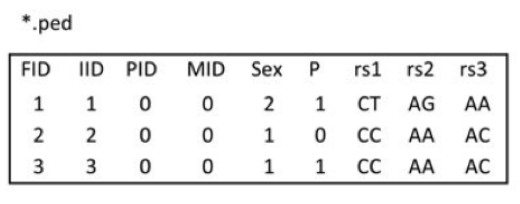
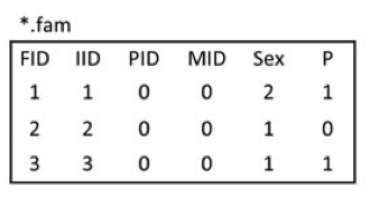
1.ped,pedigree file。ped文件一般包含6+2N列,第一至六列分别为 1. Family ID 2. Individual ID 3.Mother ID 4.Father ID 5.Sex 6.Phenotype。第六列以后为各个SNP的等位基因,两列一组,可以使用具体的碱基,也可以使用拷贝数(0,1)。

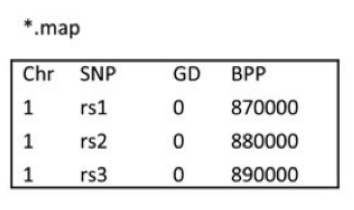
2. map,与ped文件相伴随的文件,主要包含ped文件中SNP的位置信息。一般包含4列。分别是1. 染色体号 2.SNP ID 3.遗传图距(单位为摩根或厘摩,通常分析不需要这一列,使用哑值(dummy value) 0 填充) 4.碱基对坐标。每行一个SNP,顺序与ped文件中的SNP相对应。

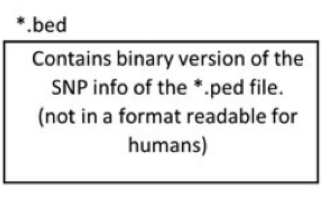
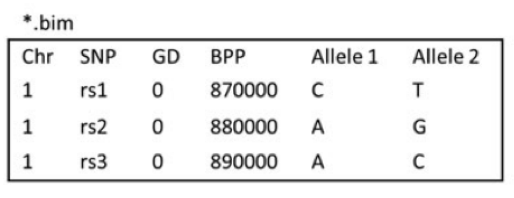
因为纯文本格式占用大量储存空间,实际操作中尽量使用二进制格式,一组ped/map文件可转换成一组bed/bim/fam文件。

3.bed ,二进制格式,存储基因型,可以想象成ped文件中除去前6列,剩下基因型数据组成的矩阵

4.bim ,纯文本,存储SNP索引 (map文件 + 两列allele信息 )

5.fam ,纯文本,存储pedigree (ped文件的前六列)

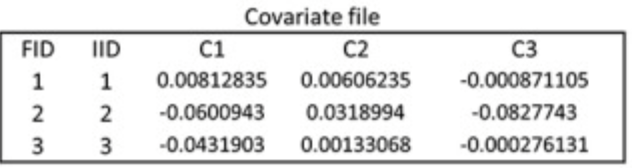
6.phenotype/covariates file (optional) ,表型与协变量文件,纯文本,该文件非必须,但表型与协变量通常使用单独的纯文本文件提供(为了准备与使用上的便捷)。该文件通常包含1.family ID 2.Individual ID, 第三列及以后为表型或协变量(常用的如年龄,性别,主成分等)。


接下来简单介绍plink的命令行语法

主要可分成三部分 1.输入 2.操作 3.输出

1.输入主要是上述的ped/map 或 bed/bim/fam文件

#ped/map: –file test 如为一组文件可只输入前缀

–bfile test

plink [输入文件] [操作] [输出文件]
plink --file input_prefix --assoc --out output_prefix

plink 格式的转换

参考文献:

1.plink官方文档

2.A tutorial on conducting genome-wide association studies: Quality control and statistical analysis

群体分层与主成分分析教程 Population structure & PCA

本文内容

原理简介
使用千人基因组项目数据与PLINK进行PCA
绘图
参考

1.原理简介

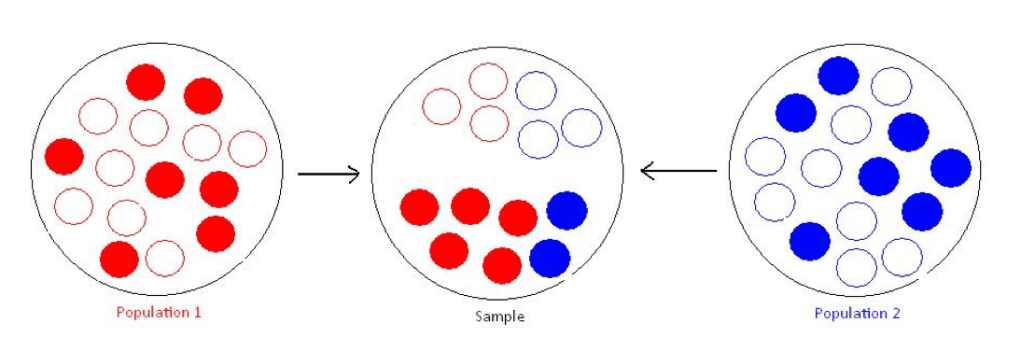
主成分分析(Principal Components Analysis, PCA)是一种常用的数据降维方法,在群体遗传学中被广泛用于识别并调整样本的群体分层问题。群体分层会导致GWAS研究中的虚假关联,考虑一个case-control研究,如下图所示,红色的群体在整体样本中占了case的大多数,那么一些对疾病并没有影响,但在红蓝两群体之间等位基因频率相差很大的genetic marker,就有可能会造成虚假关联(spurious association)

假设我们有N个样本,M个SNP的数据,其对应的矩阵记为G,Gij则为第i个样本的第j个SNP,取值范围为0, 0.5, 1 ,对应有0,1,2个参考等位基因。

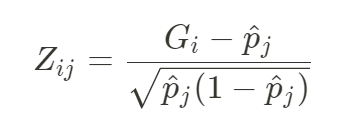
首先对G进行标准化(减去均值后除以标准差),得到的标准化后N x M矩阵记为Z,

其中pj为第j个SNP的等位基因频率。

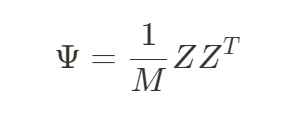
于是我们可以计算得到遗传关系矩阵GRM

GRM中第i行第j列的项就表示个体i与个体j的遗传相似性的均值。

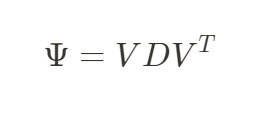
对GRM进行特征分解即可得到对应不同的群体结构特征的主成分PC。

其中V是n个特征向量Vn组成的n x n 的矩阵,D则对应由n个特征值λn组成的向量。

这个n个特征值由大到小,λ1>λ2>…>λn, 特征值的大小与相对应特征向量所能解释方差成正比(也就是,第一主成分PC1能解释最多的方差,以此类推)。

主成分可以被视为反映 由于祖先不同而造成的样本遗传变异的连续方差轴。

对于某一主成分,有相似值的个体有着相似的对应祖先。

2 .下面介绍如何使用PLINK来进行PCA分析,并去除异常个体

本教程改编自: https://www.biostars.org/p/335605/

2.1软件与硬件要求

软件版本要求:

plink > v1.9

BCFtools (tested on v 1.3)

磁盘容量要求:

  • downloaded data (VCF.gz and tab-indices), ~ 15.5 GB
  • converted BCF files and their indices, ~14 GB
  • binary PLINK files, ~53 GB
  • pruned PLINK binary files, ~ <1 Gb

2.2 下载所用数据 (本教程数据主要来自1000 Genomes Phase III imputed genotypes)

2.3 下载对应每条染色体的vcf文件

prefix="ftp://ftp.1000genomes.ebi.ac.uk/vol1/ftp/release/20130502/ALL.chr" ;

suffix=".phase3_shapeit2_mvncall_integrated_v5b.20130502.genotypes.vcf.gz" ;

for chr in {1..22}; do
    wget "${prefix}""${chr}""${suffix}" "${prefix}""${chr}""${suffix}".tbi ;
done

2.4 下载 1000 Genomes Phase III 的 ped文件,包含了个体性别,群体等基本信息

wget ftp://ftp.1000genomes.ebi.ac.uk/vol1/ftp/technical/working/20130606_sample_info/20130606_g1k.ped ;

2.5 下载参考基因组 (GRCh37 / hg19)注:不同版本的区别详见

wget ftp://ftp.1000genomes.ebi.ac.uk/vol1/ftp/technical/reference/human_g1k_v37.fasta.gz ;
wget ftp://ftp.1000genomes.ebi.ac.uk/vol1/ftp/technical/reference/human_g1k_v37.fasta.fai ;

gunzip human_g1k_v37.fasta.gz ;

2.6 将 1000 genome 的文件转化成 BCF 格式,这一步需要对原始vcf文件进行预处理:

  • 将multi-allelic calls分离(很多位点有3个及以上等位基因),并依据参考基因组标准化indels (详见:Variant Normalization 变异的标准化)
  • 将ID filed设为 CHROM:POS:REF:ALT 这个格式,确保唯一性 (文件中有很多重复的rsID,却指向不同的位置x ID -I +'%CHROM:%POS:%REF:%ALT' 先抹掉现有ID,然后重新将ID设为 CHROM:POS:REF:ALT
  • 去掉重复的变异
for chr in {1..22}; do
    bcftools norm -m-any --check-ref w -f human_g1k_v37.fasta \
      ALL.chr"${chr}".phase3_shapeit2_mvncall_integrated_v5b.20130502.genotypes.vcf.gz | \
      bcftools annotate -x ID -I +'%CHROM:%POS:%REF:%ALT' | \
        bcftools norm -Ob --rm-dup both \
          > ALL.chr"${chr}".phase3_shapeit2_mvncall_integrated_v5b.20130502.genotypes.bcf ;

    bcftools index ALL.chr"${chr}".phase3_shapeit2_mvncall_integrated_v5b.20130502.genotypes.bcf ;
done

2.7 将BCF转化成PLINK格式

for chr in {1..22}; do
    plink --noweb \
      --bcf ALL.chr"${chr}".phase3_shapeit2_mvncall_integrated_v5b.20130502.genotypes.bcf \
      --keep-allele-order \
      --vcf-idspace-to _ \
      --const-fid \
      --allow-extra-chr 0 \
      --split-x b37 no-fail \
      --make-bed \
      --out ALL.chr"${chr}".phase3_shapeit2_mvncall_integrated_v5b.20130502.genotypes ;
done

2.8 对每条染色体 Prune variants

mkdir Pruned ;

for chr in {1..22}; do
    plink --noweb \
      --bfile ALL.chr"${chr}".phase3_shapeit2_mvncall_integrated_v5b.20130502.genotypes \
      --maf 0.10 --indep 50 5 1.5 \
      --out Pruned/ALL.chr"${chr}".phase3_shapeit2_mvncall_integrated_v5b.20130502.genotypes ;

    plink --noweb \
      --bfile ALL.chr"${chr}".phase3_shapeit2_mvncall_integrated_v5b.20130502.genotypes \
      --extract Pruned/ALL.chr"${chr}".phase3_shapeit2_mvncall_integrated_v5b.20130502.genotypes.prune.in \
      --make-bed \
      --out Pruned/ALL.chr"${chr}".phase3_shapeit2_mvncall_integrated_v5b.20130502.genotypes ;
done

2.9 准备一个索引文件

find . -name "*.bim" | grep -e "Pruned" > ForMerge.list ;

sed -i 's/.bim//g' ForMerge.list ;

2.10 合并每条染色体的plink文件

如果有自己的文件需要合并,可以在这一步加进索引文件中

plink --merge-list ForMerge.list --out Merge ;

2.11 进行主成分分析 PCA

plink --bfile Merge --pca

3 . 绘图

需要之前下载好的ped文件,20130606_g1k.ped

以及群体的三个字母的编码对照表(如下所示,来自1000genomes.org的ftp)

#Populations

This file describes the population codes where assigned to samples collected for the 1000 Genomes project. These codes are used to organise the files in the data_collections' project data directories and can also be found in column 11 of many sequence index files.

There are also two tsv files, which contain the population codes and descriptions for both the sub and super populations that were used in phase 3 of the 1000 Genomes Project:

<ftp://ftp.1000genomes.ebi.ac.uk/vol1/ftp/phase3/20131219.populations.tsv>
<ftp://ftp.1000genomes.ebi.ac.uk/vol1/ftp/phase3/20131219.superpopulations.tsv>

###Populations and codes

         CHB	Han Chinese             Han Chinese in Beijing, China
         JPT	Japanese                Japanese in Tokyo, Japan
         CHS	Southern Han Chinese    Han Chinese South
         CDX	Dai Chinese             Chinese Dai in Xishuangbanna, China
         KHV	Kinh Vietnamese         Kinh in Ho Chi Minh City, Vietnam
         CHD	Denver Chinese          Chinese in Denver, Colorado (pilot 3 only)
	
         CEU	CEPH                    Utah residents (CEPH) with Northern and Western European ancestry 
         TSI	Tuscan                  Toscani in Italia 
         GBR	British                 British in England and Scotland 
         FIN	Finnish                 Finnish in Finland 
         IBS	Spanish                 Iberian populations in Spain 
	
         YRI	Yoruba                  Yoruba in Ibadan, Nigeria
         LWK	Luhya                   Luhya in Webuye, Kenya
         GWD	Gambian                 Gambian in Western Division, The Gambia 
         MSL	Mende                   Mende in Sierra Leone
         ESN	Esan                    Esan in Nigeria
	
         ASW	African-American SW     African Ancestry in Southwest US  
         ACB	African-Caribbean       African Caribbean in Barbados
         MXL	Mexican-American        Mexican Ancestry in Los Angeles, California
         PUR	Puerto Rican            Puerto Rican in Puerto Rico
         CLM	Colombian               Colombian in Medellin, Colombia
         PEL	Peruvian                Peruvian in Lima, Peru

         GIH	Gujarati                Gujarati Indian in Houston, TX
         PJL	Punjabi                 Punjabi in Lahore, Pakistan
         BEB	Bengali                 Bengali in Bangladesh
         STU	Sri Lankan              Sri Lankan Tamil in the UK
         ITU	Indian                  Indian Telugu in the UK

Should you have any queries, please contact info@1000genomes.org.

下面演示用PYTHON进行绘图:

import pandas as pd
import numpy as np
import matplotlib.pyplot as plt
import seaborn as sns

#读取文件
pca = pd.read_csv("1000_all.eigenvec"," ",header=None)
ped = pd.read_csv("20130606_g1k.ped","\t")
#重命名pca文件的列
pca = pca.rename(columns=dict([(1,"Individual ID")]+[(x,"PC"+str(x-1)) for x in range(2,22)]))

#join两个数据表
pcaped=pca.join(ped,on="Individual ID",how="inner")

#给个体加上super population的标签
pcaped["Superpopulation"]="unknown"
pcaped.loc[pcaped["Population"].isin(["JPT","CHB","CDX","CHS","JPT","KHV","CHD"]),"Superpopulation"]="EAS"
pcaped.loc[pcaped["Population"].isin(["BEB","GIH","ITU","PJL","STU"]),"Superpopulation"]="SAS"
pcaped.loc[pcaped["Population"].isin(["CLM","MXL","PEL","PUR"]),"Superpopulation"]="AMR"
pcaped.loc[pcaped["Population"].isin(["CEU","FIN","GBR","IBS","TSI"]),"Superpopulation"]="EUR"
pcaped.loc[pcaped["Population"].isin(["ACB","ASW","ESN","GWD","LWK","MSL","YRI"]),"Superpopulation"]="AFR"

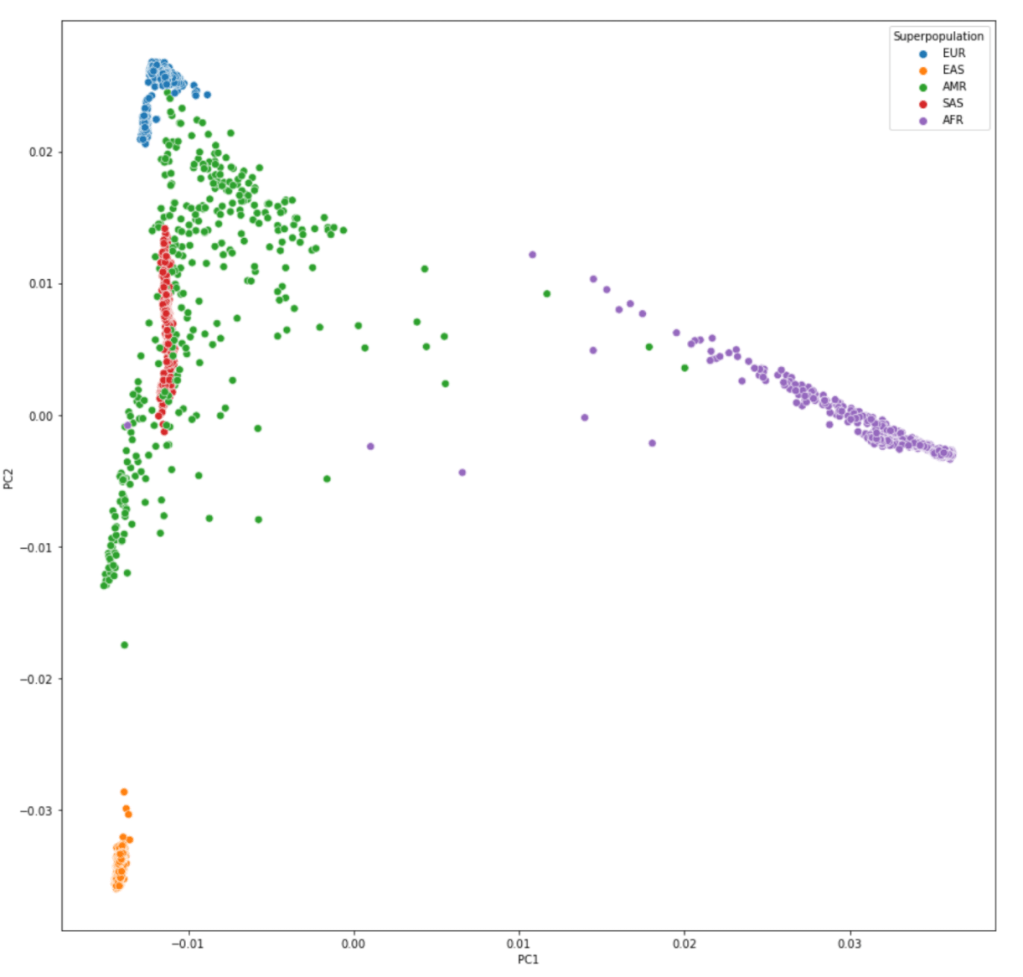
#绘制PC1与PC2的散点图,以Super population分不同颜色
plt.figure(figsize=(15,15))
sns.scatterplot(data=pcaped,x="PC1",y="PC2",hue="Superpopulation",s=50)


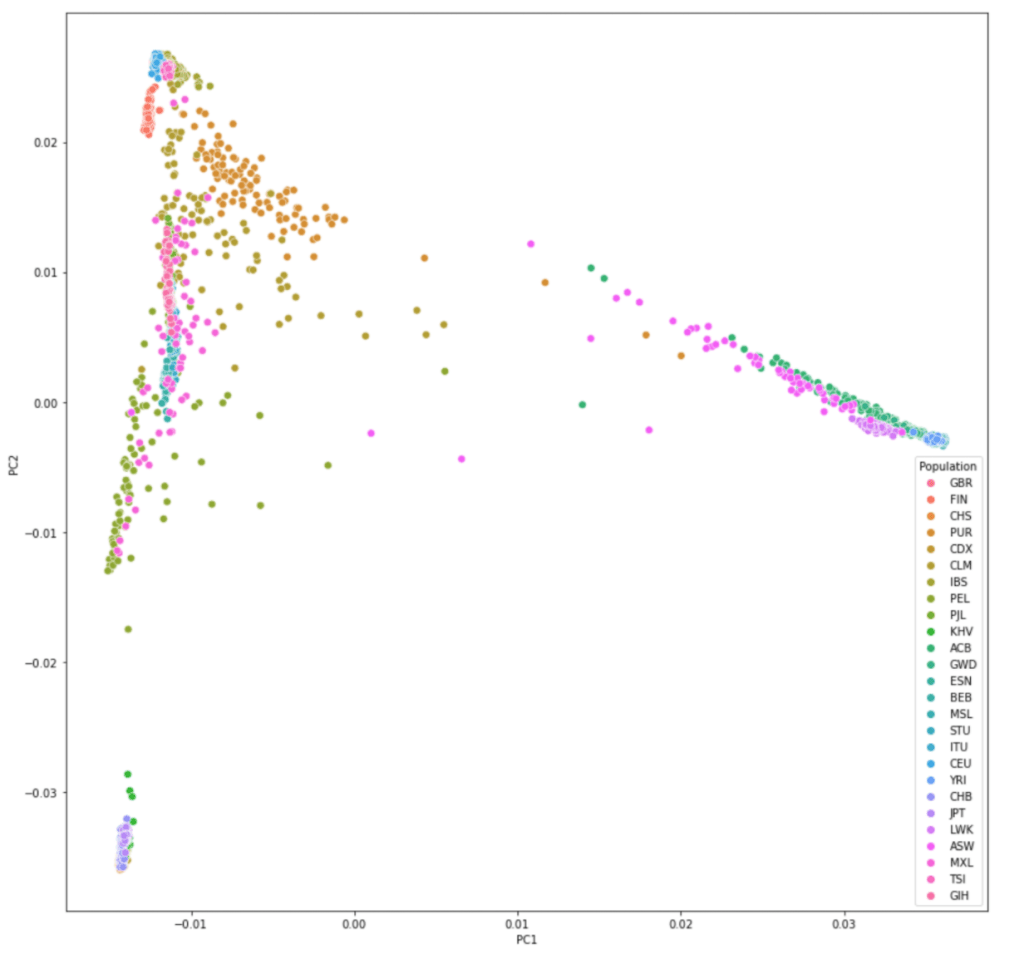
#绘制PC1与PC2的散点图,以Population分不同颜色
sns.scatterplot(data=pcaped,x="PC1",y="PC2",hue="Population",s=50)

参考:

https://www.cog-genomics.org/plink/1.9/strat

Price, A. L. et al. Principal components analysis corrects for stratification in genome-wide association studies. Nat. Genet. 38, 904–909 (2006).

 https://www.biostars.org/p/335605/

使用python绘制GWAS的曼哈顿图 Mahattan plot

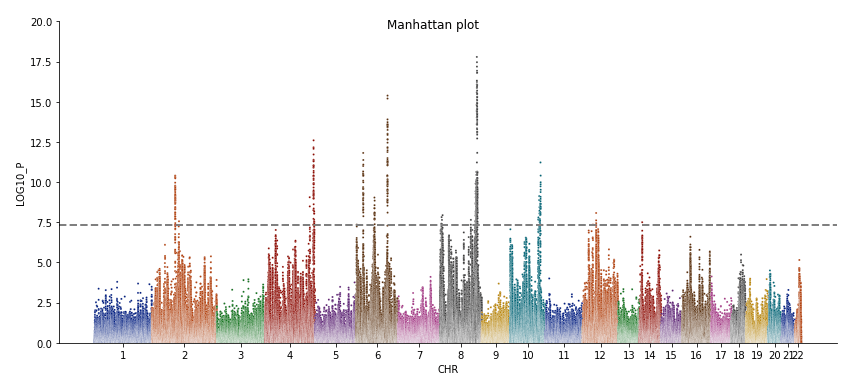
曼哈顿图对GWAS结果进行可视化最常用的图之一,其横轴可理解为snp在相应染色体上的位置,纵轴则为-log10(P)。因其酷似纽约曼哈顿的天际线而被命名为曼哈顿图。

本文将介绍利用python作图的方法。

要使用的package:

pandas , numpy, matplotlib, seaborn


具体代码如下:

import pandas as pd
import matplotlib.pyplot as plt
import seaborn as sns
import numpy as np

#读取GWAS结果,至少要包含 染色体号(CHR),P值(p.value),以及确保snp被正确排序
gwas_sumstats = pd.read_csv("test.txt")  

#构建一个辅助列,作为各个snp在曼哈顿图x轴上的坐标
gwas_sumstats["i"]=gwas_sumstats.index

# (optional) 如果p值没有转换成 -log10(p) 那么需要
gwas_sumstats["LOG10_P"]=-np.log10(gwas_sumstats["p.value"])

#开始做图
plot = sns.relplot(data=gwas_sumstats, x='i', y='LOG10_P', aspect=2.3, 
                   hue='CHR', palette = 'dark', s=4, legend=None) 

#处理x轴上每个chr标注的位置,这里使用每条染色体上SNP索引的中间值
chrom_df=gwas_sumstats.groupby('CHR')['i'].median()

#在上一步计算得到的位置添加x轴的标注
plot.ax.set_xticks(chrom_df)
plot.ax.set_xticklabels(chrom_df.index)

#最后添加各种标注,辅助线,调整图像范围
plot.ax.set_xlabel('CHR')
plot.ax.set_ylim(0,20)
plot.ax.axhline(y=-np.log10(5e-8), linewidth = 2,linestyle="--",color="grey")
plot.fig.suptitle('Manhattan plot')

这样我们就得到了如下的曼哈顿图:

Regenie – 高效的全基因组回归

本方法由Regeneron Genetics Center开发,regenie基于一种机器学习方法(Stacked block ridge regression)。Regenie相比于之前的基于LMM的方法,如bolt-LMM,fastGWA,以及SAIGE等方法,具有以下主要特点:

  • 1 相比其他方法 更快,更省内存。
  • 2 可适用于数量表型,或是二分类表性。
  • 3 可以同时对多个表型进行检验。
  • 4 可以矫正在case-control不平衡时,mac过低造成的SNP效应值的过高估计(SAIGE-SPA存在此问题)。

regenie 方法简介:

regenie与saige或fastGWA一样,同样采用了两个步骤的模式来进行检验。

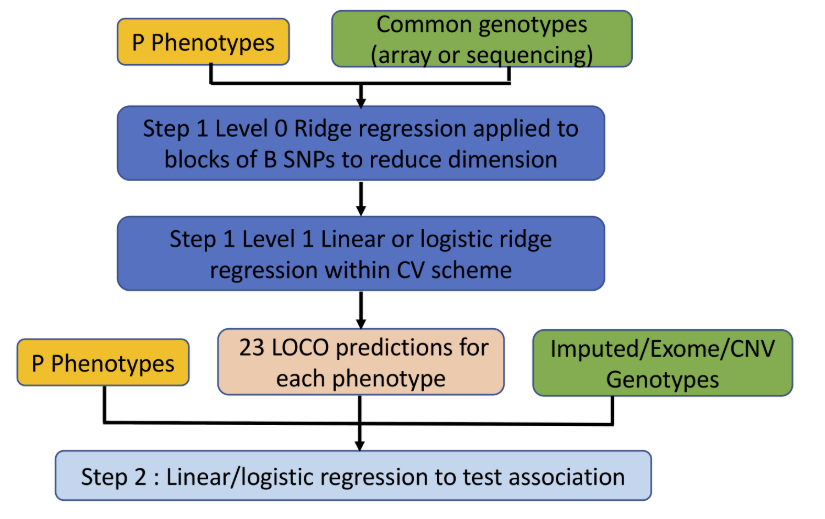
STEP 1,估计空模型 (主要利用 Stacked block ridge regression的方法)

1 层叠区块脊回归 Stacked block ridge regression

1.1 分割区块 Block partitions

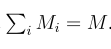
将转化后的基因型矩阵G分割为B个连续的区块,每个区块所包含的SNP都来自同一条染色体。定义区块的方法有很多种,例如物理距离,遗传距离等等,实际使用中,一般将区块大小固定。设mi为第i个区块的SNP数量,则有:

1.2 0级脊回归 Level 0 ridge regressions

这一步的目的是减小估计值的数量,使估计值能够捕获(1)区块中SNP之间的LD信息(2)SNP对表性的任何效应。

这一步考虑拟合带有L2惩罚项的线性模型(也就是脊回归)。

其中,

我们可以通过以下式子估计SNP的效应值γ

其中λ为收缩系数, λ 越高会使估计的效应值趋近于0. 效应值得估计也可以被视为贝叶斯框架下的最大后验估计值(MAP),这个框架里对于SNP效应值,我们使用一个正态先验概率:

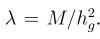
基于以上假设,我们可以将脊回归的收缩系数视为一个SNP遗传力的方程,即

由于我们并不知道SNP对于表型真实的效应值,所以考虑使用一组系数来反应SNP的遗传力可能的值。

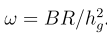
更准确的说,就是选择R个介于0到1之间等间隔的值。然后利用该值来计算λ。

对于每个大小为Mi的区块,我们都可以计算出R个估计值,

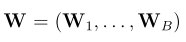
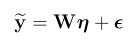
第一步的结果就是一个Nx(BR)的预测值矩阵。

1.3 1级脊回归 Level 1 ridge regression

1.3 1级脊回归 Level 1 ridge regression

为了进一步整合第一步结果W中的预测值,在第一步脊回归的基础上再次脊回归(称为stacking),目的是通过惩罚项获得一个最优化的区块预测值的线性组合。

通过变换使W有单位方差,然后进行第二次脊回归,有

其中

该式的解可以由以下式子表示,

该式有一个封闭的解

同第一次脊回归一样,超系数w从一组个数为Q的收缩系数中选择。

一个最适的w*通过最小化预测值误差来获得,

1.4 K-fold cross-validation

由于W与表型相关,采用K-fold cross-validation来避免过拟合。

1.5 LOCO

为了避免近端污染(proximal contamination),在 cross-validation 的计算中会将一整条染色体的区块的值,设为0。这样最终,我们会有22个预测值。

1.6 对于二分类表型,

第一次回归与数量表型一样,但在第二次回归时,采用逻辑斯蒂回归而不是脊回归。

STEP 2 关联检验 Association testing

第二步,检验,

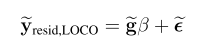
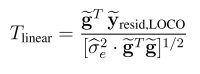
2.1 对于数量表型,考虑一下模型,

使用分数检验,统计量如下:

2.2 对于二分类表型,采用以下模型

2.3 Firth logistic regression(重点)

当case-control不平衡时,稀有变异的检验通常会有不稳定的效应估计值与标准差,主要是在逻辑斯蒂回归中,case里不存在minor allele时会出现拟完全分离(quasi-complete separation)。解决方案之一便是,在逻辑斯蒂回归中加入一个惩罚项,

此图像的alt属性为空;文件名为image-87.png

但这个方法计算量巨大,所以regenie使用了近似的 Firth logistic regression ,使用了一个调整后的惩罚项:

这样就大大减少了计算量,最后应用likelihood ratio test (LRT) 来检验。

2.4 regnie在第二步中也支持saige所使用的SPA方法。这里就略过。

最后放上文章中的总结图:

参考:

https://rgcgithub.github.io/regenie/

https://www.biorxiv.org/content/10.1101/2020.06.19.162354v2